

In today’s fast-paced call and contact center environment, information is abundant, but knowledge isn’t always readily available when needed.
Every interaction, ticket, and internal conversation holds valuable insights to improve customer experience (CX), reduce handle time, and empower agents. Yet, too often, that knowledge stays locked in emails, tribal memory, or disconnected systems.
That’s where knowledge management (KM) and knowledge management systems (KMS) come in. In Part 1, I covered purpose, structure, and metrics, while Part 2, in this issue, focuses on KM readiness, governance, selection, upgrading, and setup.
A KMS is a Team Effort
During one of my routine quality assurance (QA) days, I reviewed a call that immediately caught my attention. A member contacted us asking for the subrogation department’s email address and fax number: a fairly common request.
But instead of providing the information, the agent hesitated. She told the caller she wasn’t sure if that department even had a fax number or an email and that she’d only been instructed to transfer these calls to the contact listed for subrogation.
It was clear the agent hadn’t checked the KMS before responding. The information she needed was right there: just a quick search away.
…even the best knowledge system doesn’t add value unless agents know how – and when – to use it.
After the call, I reached out to her via Microsoft Teams. When I mentioned the call, she admitted she didn’t know that information was even in the KMS. So, I walked her through it, step by step. Within seconds, we found the correct fax number and email address listed under the subrogation department’s contact procedures.
To her credit, the agent immediately followed up with the caller and provided the correct information.
That moment was a powerful reminder: even the best knowledge system doesn’t add value unless agents know how – and when – to use it. Its true value doesn’t lie in the technology alone but in how it’s embraced, supported, and used by the people on your front lines.
To ensure your KMS delivers lasting results, leaders must look beyond implementation and focus on building a system that works for – and with – their teams. Here’s how to make that happen:
- Communicate the “why.” Show agents how the KMS makes their jobs easier: faster answers, fewer errors, smoother calls, and consistency. When they understand the value, they’ll buy in.
- Involve agents early. Invite frontline teams to help shape the system, including the selection of applications. Their input improves usability and builds ownership from day one.
- Train for real-world use. Go beyond basic training. Teach agents how to search smart, contribute content, and apply KM during calls.
- Share success stories. Highlight wins: like shorter calls or quick onboarding. Real results build trust in the system.
- Encourage knowledge sharing. Make it easy to share tips, suggest updates, and improve content.
- Keep it fresh. Review and update content regularly. Utilize feedback and call data to ensure your KM remains accurate and relevant.
A KMS fails on its own; it requires ongoing updates, agent coaching, leadership support, and reinforcement through QA to remain active and effective.
Is Your Contact Center Ready for a KMS?
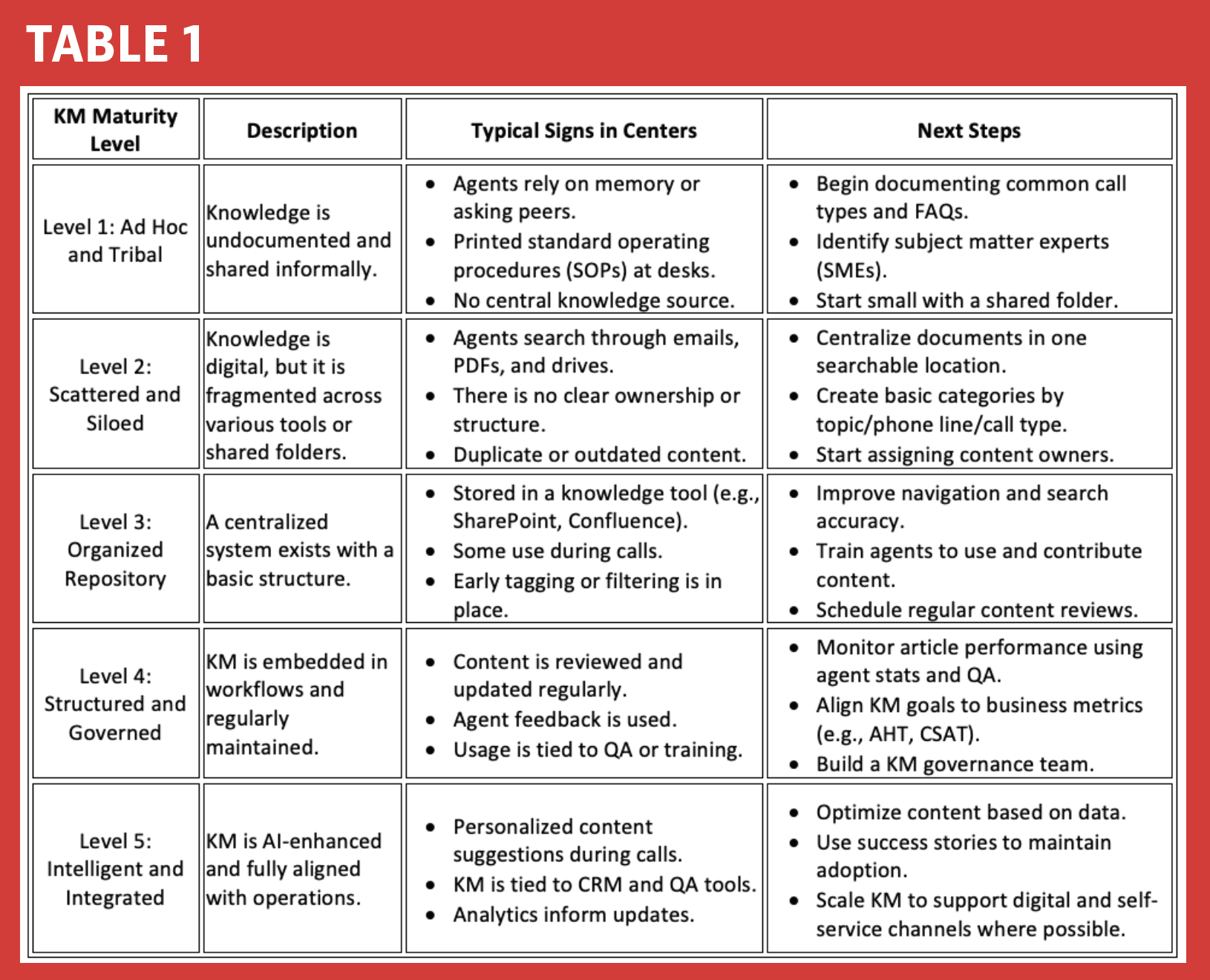
Table 1 (see following) provides a simple framework to assess where your call or contact center stands before implementing a KMS. You can use it to identify your current stage and what you need to focus on next.
Understanding KM Governance
Think of your KMS as a high-performance vehicle. It gets your agents where they need to go, and fast. But without regular maintenance, it breaks down.
That’s where KM governance comes in. It is the engine under the hood: the structure, roles, and routines that keep your knowledge accurate, organized, and trusted by all.
It’s not just about who uploads articles. It’s about who owns the content, how it’s reviewed, when it gets updated, and how agents can give feedback when something doesn’t make sense.
Selecting, Upgrading, or Replacing Your KMS
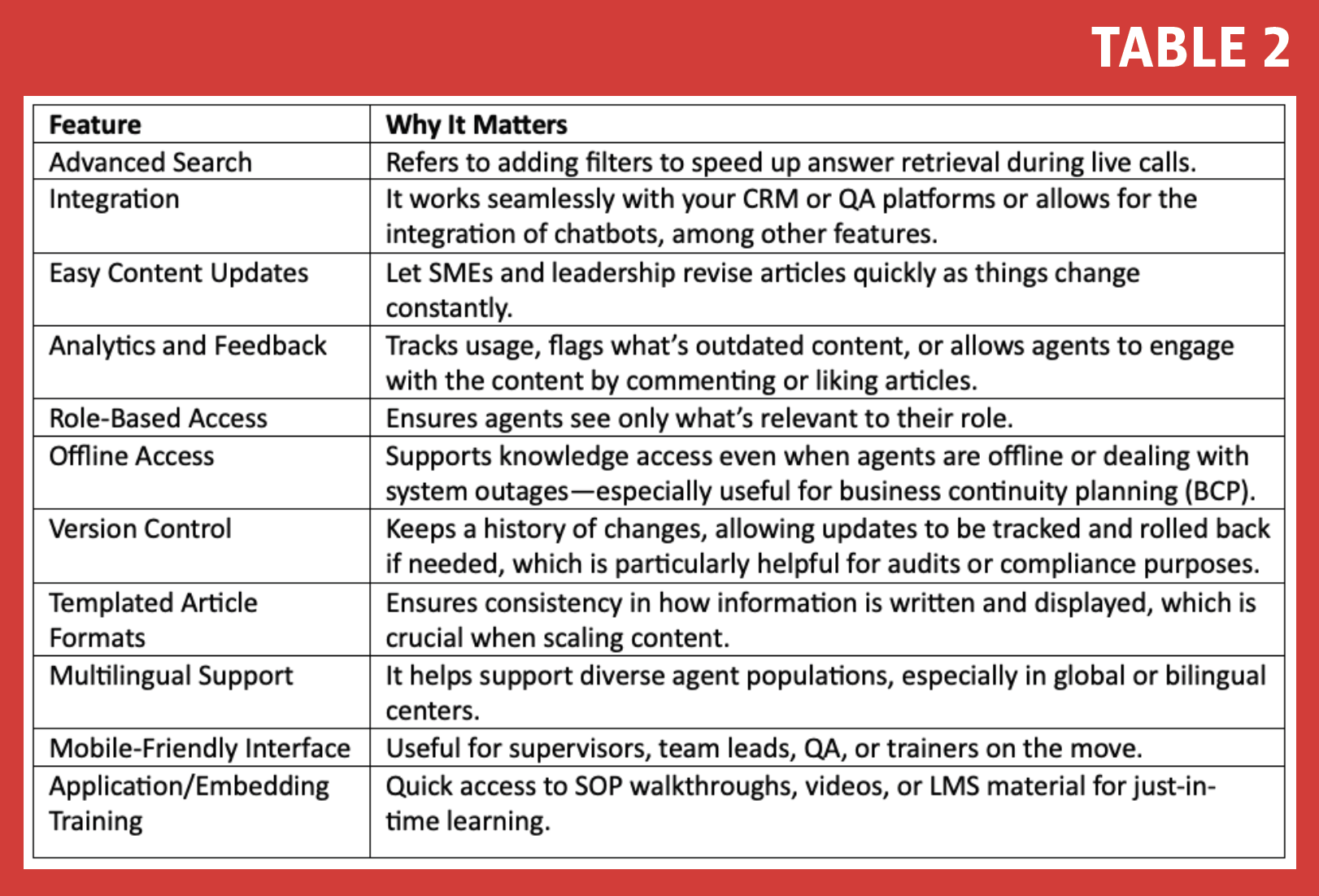
Making such a decision (see Table 2) is not just a quick switch that goes unnoticed; it’s an operational one. The system must support how your agents work, how your knowledge flows, and how your teams grow.
Here’s how to approach it from a call or contact center lens:
Start with your purpose, not the platform
- Define what you’re trying to solve (e.g., long handle times, inconsistent answers, slow onboarding).
- Identify who will use it: agents, leaders, QA, or all of the above.
- Decide what success looks like (e.g., 20% fewer escalations, 15% faster ramp-up time).
What to look for when selecting a KMS
What is scaling content, and why do it?
Scaling content means growing smart so that your KMS continues to serve agents well, whether you have 10 team members or 1,000.
It’s about structuring articles and pages in a way that makes information easy to find and easy to expand without overwhelming agents when they need quick answers during a call.
Signs that your KMS needs repair or changing
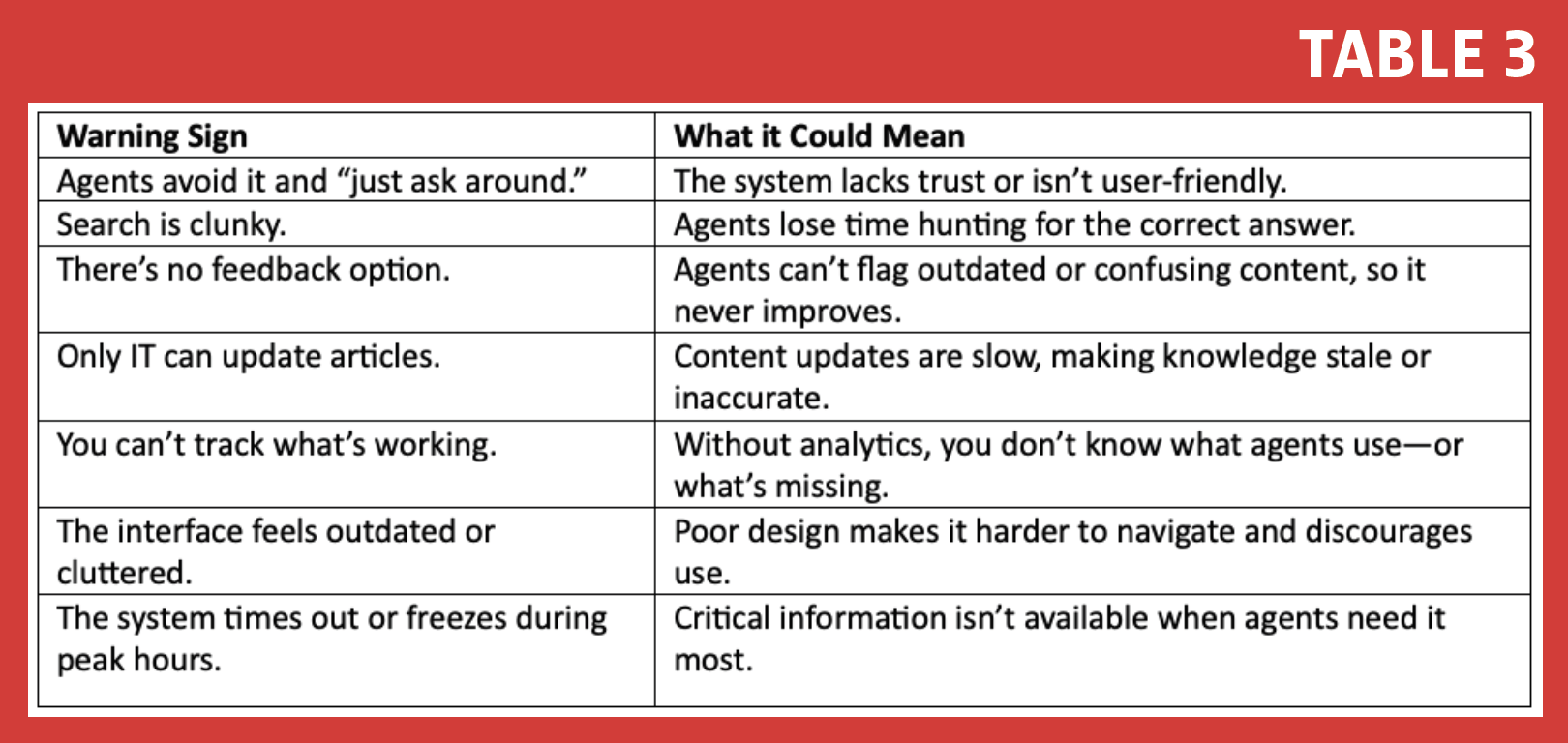
If your agents are ignoring your KMS or relying on sticky notes, email chains, or tribal knowledge, here are several red flags that could indicate whether it has a fixable problem orone that requires replacement (see Table 3). A KMS should support your team, not hinder them.
The KMS could sometimes be outdated for your changing needs, be too old to fix, have reached end of life, or no longer be supported by the vendor. Consult and work closely with your IT team on the next steps.
How to Migrate to a New KMS
Switching to a new KMS is exciting, but it’s essential to keep in mind that it’s not as simple as a copy-paste job. The goal is to migrate your content to the new KMS without losing the critical pieces.
Start small. Keep it simple. Involve your agents.
Here are a few things I’ve learned about KMS migration:
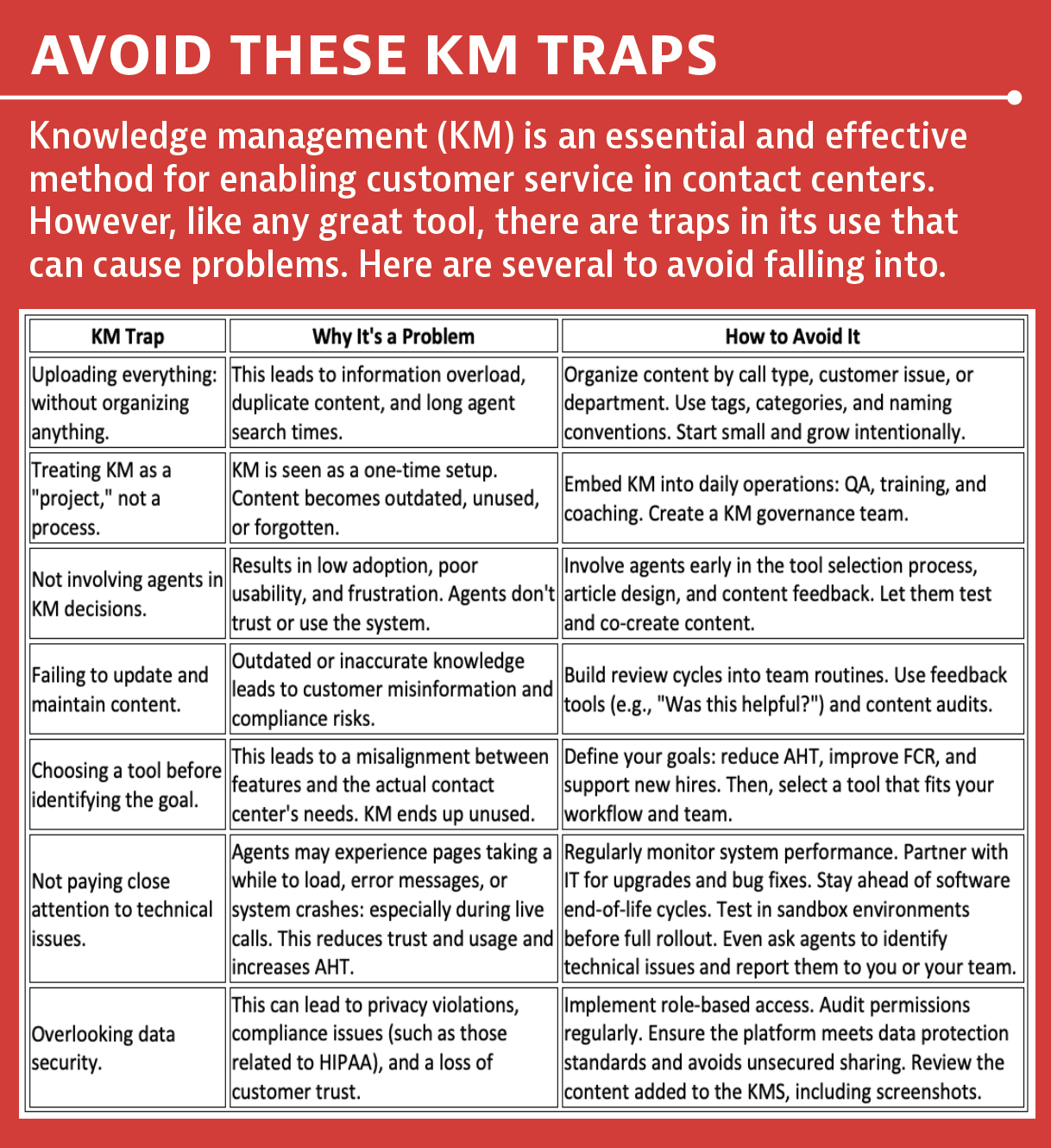
- Audit what you have. Before you move anything, take inventory. Archive outdated, duplicate, or rarely used articles. If no one uses it anymore, don’t bring it over.
- Prioritize high-impact content. Start with the knowledge agents use most, such as FAQs and escalation steps. You don’t need to migrate everything at once. Focus on what helps agents today.
- Involve frontline agents early. Let agents test the layout, naming conventions, and search functionality to ensure they are effective. Their feedback ensures the system makes sense where it matters: on the floor.
- Tag and structure content wisely. Group knowledge by how agents think, such as call types, departments, and workflows. Use clear categories, keywords, and filters to maintain an intuitive navigation experience.
- Train before you launch. Don’t wait until go-live day. Run mini-training sessions ahead of time: show agents how to navigate through the KMS.
KMS Setup (Without Making It Complicated)
You don’t need a big committer. Start with:
- A KM leads to coordinate everything.
- A few content owners: often team leads, trainers, QA, or SMEs.
- A feedback loop so agents can flag unclear or outdated content.
- A simple review calendar (e.g., every 90 days) to keep things fresh.
A strong governance process turns your KMS from a content warehouse into a dynamic tool that the agents use.
A KMS isn’t just a tool; it’s a game-changer. It helps agents find answers more quickly, reduces errors and enhances customer trust. But it only works if it’s kept alive through ownership, feedback, and your team’s support.
Start small. Keep it simple. Involve your agents.
Because when knowledge flows freely, your agents perform better, and your customers feel it. Every call. Every time.
This article appears in December 2025.
